What’s a Twitter Chat?
New to Twitter chats? Here’s Tom Whitby’s detailed explanation of this excellent form of personal professional development.

There are now hundreds of Education Twitter chats taking place around the world at almost any time of day or night. To follow any chat in real-time all one needs is the hashtag (#). The hashtag is the key to the chat. Using TweetDeck, Hootsuite, or some other third-party application it is easy to create a column that will follow only the hash tagged tweets of the chat. That will focus on and deliver each of the tweets in the chat in the order that they are posted.
Of course in a chat that may have fifty to a hundred participants it is impossible to follow every tweeter’s tweets. Very much like any face-to-face social gathering of such numbers of people, one would only engage with a few chatters at a time and focus on the topic of discussion within that group. I enter chats with the intent of engaging…
View original post 797 more words
How to Add a Checklist to your ETFO AQ Course in D2L
A Checklist in D2L is an excellent tool for students/candidates to track their progress in a course. The video below demonstrates how to create a Checklist for candidates in your ETFO AQ Course in D2L. It can, however be helpful to instructors in other environments that use D2L.
In D2L’s Brightspace Community you can find many resources about better ways to use the features in D2L. Here’s their short video about Checklists, and how they can be combined with Release Conditions to encourage students to use the Checklist. A Release Condition is an Intelligent Agent that requires a student to complete a task, in this case, checking off a completed item in the Checklist, before they can complete another task. See my Blog post on Intelligent Agents for an introduction to their use.
I ran across this great series of Blog Posts on the EduBlogs Teacher Challenge. This 10 Step process will help you create, develop and nurture your own Personal Learning Network. It is very thorough and too good not to pass along to my Network.
Here are their 10 steps with links to each one:
- What is a PLN?
- Using Twitter to Build your PLN
- Participate in Twitter Chats
- Making time to Build your PLN
- Using Blogs as Part of your PLN
- Using Curation Tools as part of your PLN
- Using Diigo as part of your PLN
- Using Webinars to build your PLN
- Back to Classroom 2.0
- Making Connections
I added each of these to my Scoopit PLN Resources Curated Page as well. Click to access them there if you wish.
Now, get started on a Personal Learning Network, or further develop your Network this year using these powerful suggestions !
Universal Skills All Learners Should Know How to Do
This is a great list that should evoke some discussion. What are the MOST important skills? Are there some that are missing? Are there others that could be left off this list? Why? Have a look!

This morning I was thinking about the things that all young people should know how to do regardless of income, geographical location, life goals, etc. I started a list – see below. Some have “always” been true – some are unique to this century of learning. Let me know of any other universal skills you believe young people should know how to do.
- How to be a self-directed learner – finding and using resources (both face-to-face and online) to learn and improve personal interests
- How to do effective online searches
- How to develop one’s own Personal Learning Network (PLN)
- How to post on social media while managing one’s digital footprint
- How to evaluate websites and online tools for credibility
- How to orally communicate…
View original post 172 more words
Adding a Twitter Feed to your D2L Course Homepage
Twitter Feeds in D2L
This tutorial is aimed at instructors of ETFO AQ Courses, and will walk through the process of adding a Twitter feed to a Course Homepage. If you proceed through the following how-to video and screenshots, you’ll be able to create a Twitter feed on your Homepage. There’s a reward at the bottom of this screen for those who do. If you want to scroll to the bottom right now, the reward is a Dr. Seus Guide to Twitter for those new to Twitter, that will inspire you to get on board with it.
Perhaps the first question that needs to be considered before going through all this is “Why add a Twitter Feed to an AQ Course?”

Why Twitter?
Twitter is an excellent way to share relevant links, ideas, research, articles, conference highlights, strategies, candidate learning summaries, photos and videos from your Personal Learning Network with your course candidates. Perhaps you have already created your own Twitter account from which you are tweeting or retweeting course related snippets. These Tweets can appear on your Course Homepage in a Widget that can easily be created, if you wish.
Maybe you have already created a Twitter #hashtag through which you share important Tweets in your course, where content can be added by you and your candidates, using the agreed upon #hashtag e.g. #etfoaqiict, thereby creating a searchable collection of related tweets. This too can be added to your course homepage.
There are hundreds of educational #hashtags being used to filter out relevant Tweets by educators around the world. You may wish to add a #hashtag search of one of them and then add it to your Homepage. Examples are the #edtech or #mathchat which can be found in this List of Educational Hashtags. There are lots of goodies in that list! The Librarianship AQs are using the Ontario Teacher Librarian #hashtag: #ONTtl .
Some instructors are already using a #hashtag to conduct both synchronous and asynchronous online discussions via Twitter, where Tweets can occur in real time in the former, and at anytime in the latter. The benefit of both, however, is that the stream of Tweets, called a feed, can be read by anyone at anytime by searching the #hashtag.
Having a #hashtag or personal feed right on your Course Homepage gives it prominence, encourages participation, requires no searching and builds course community.
How to Add a Twitter Feed
Just how does one add a Twitter Feed to a Course Homepage? The following Youtube Video provides an overview of the step-by-step process for adding a Twitter feed, and below it, are a series of screen shots breaking down the main steps.
Step-by-Step Instructions and Screenshots
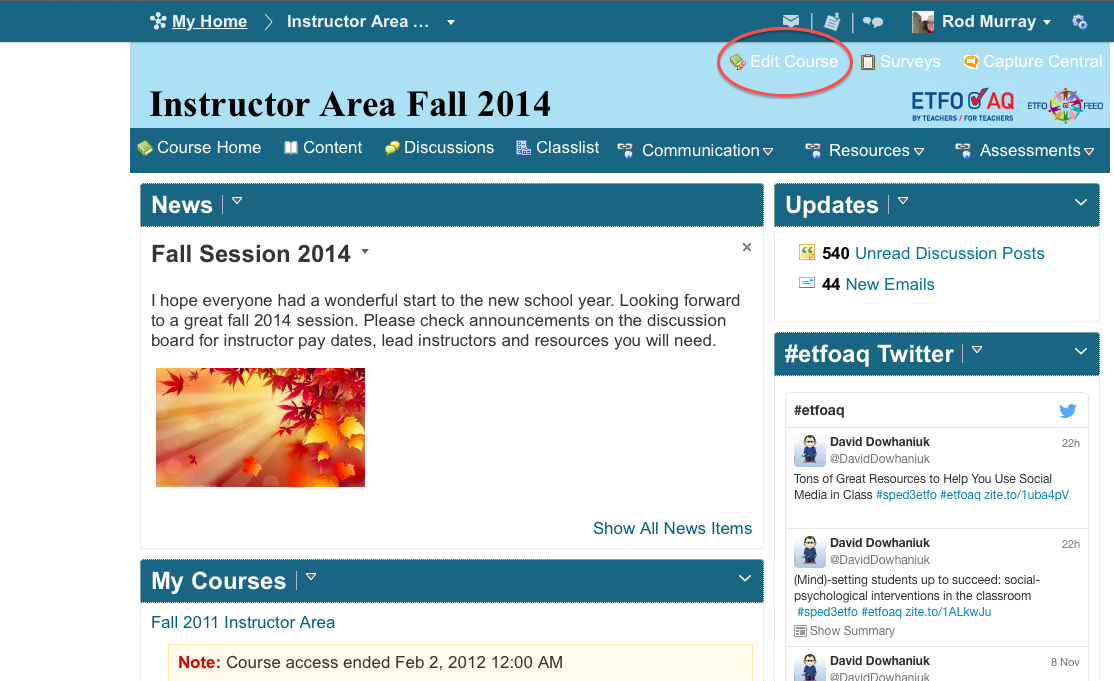
1) Visit your Course Homepage and click on the Edit Course Button in the top right of your screen as shown by the red oval below.
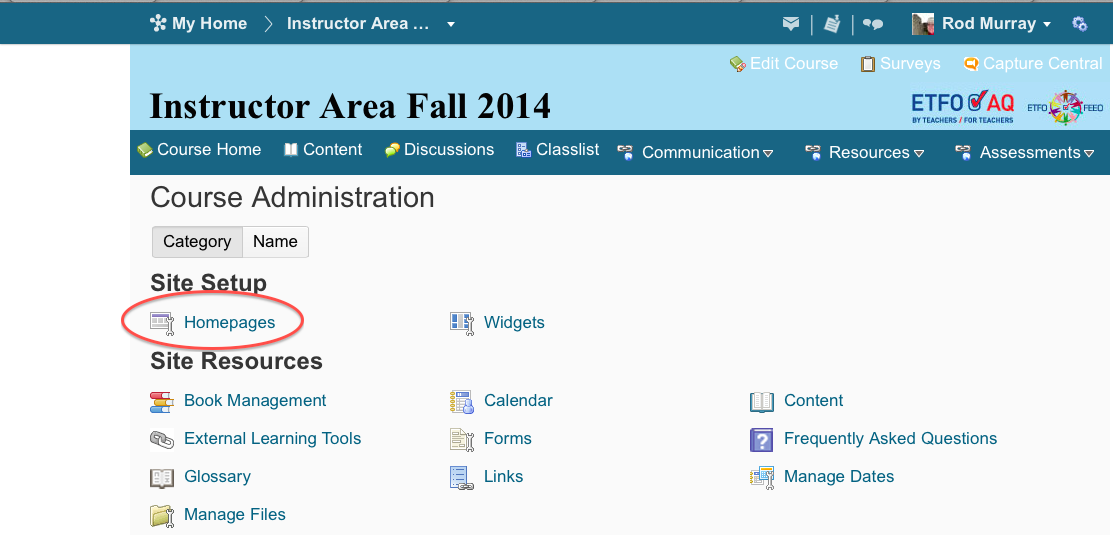
2) Click on the Homepages tool, shown.
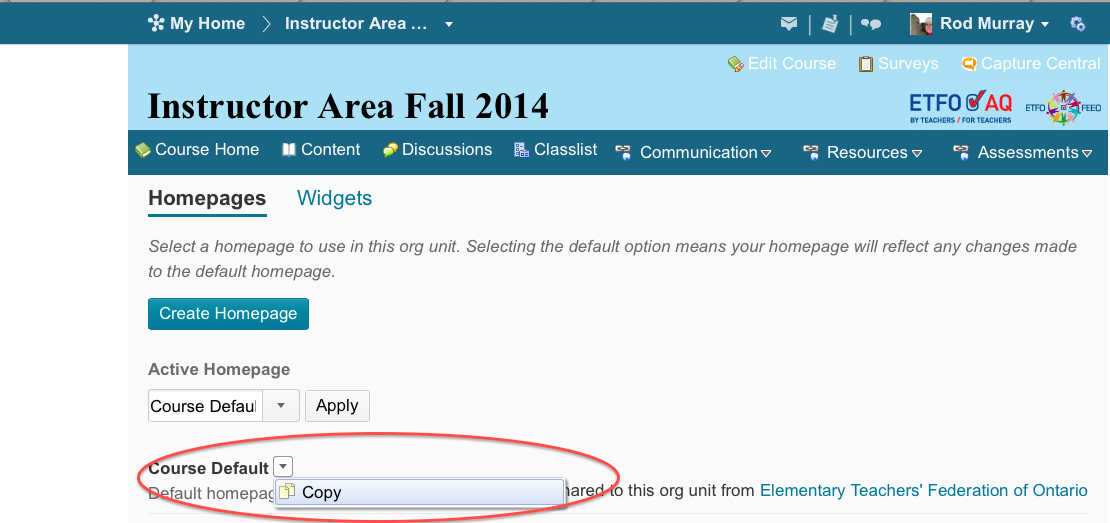
3) If you do not see a Homepage called Course Default Copy, click on the drop down menu next to Course Default and make a copy of your course so that you can make changes and not affect the Course Default. Always work with the Course Default Copy and make sure it’s the Active homepage. There is an Active Homepage drop down menu that chooses the Active page. Make sure your Copy is Active!
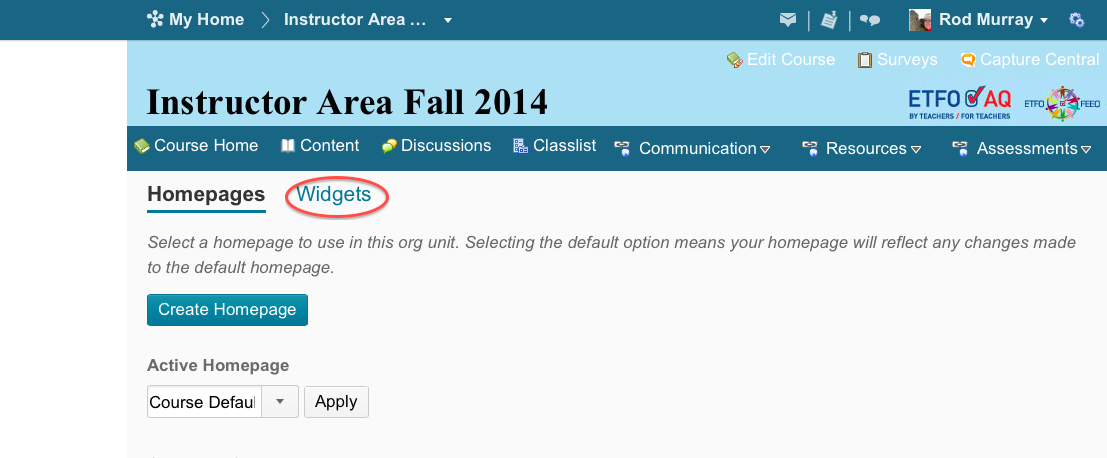
4) Now that you’ve made a Copy, click on the Widgets tab.
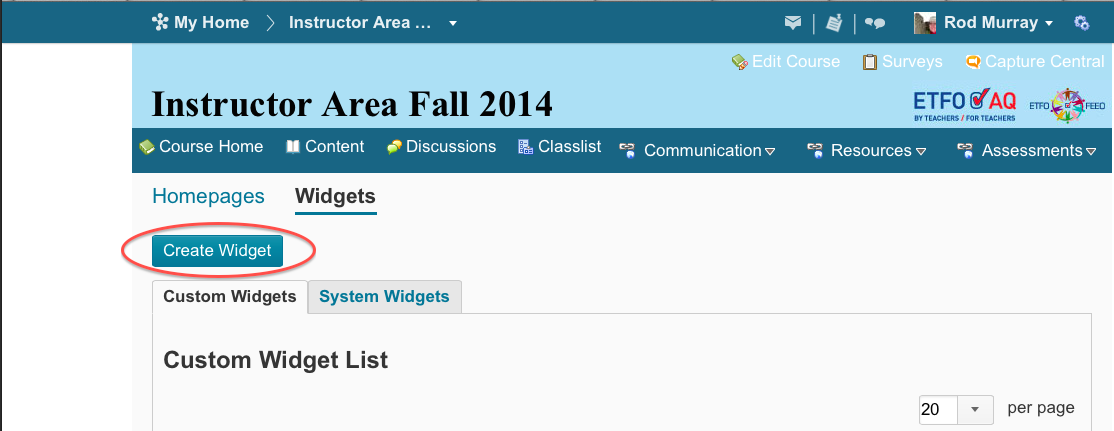
5) Click on Create Widget and give your new Widget an appropriate name e.g. #etfoaq Twitter Feed
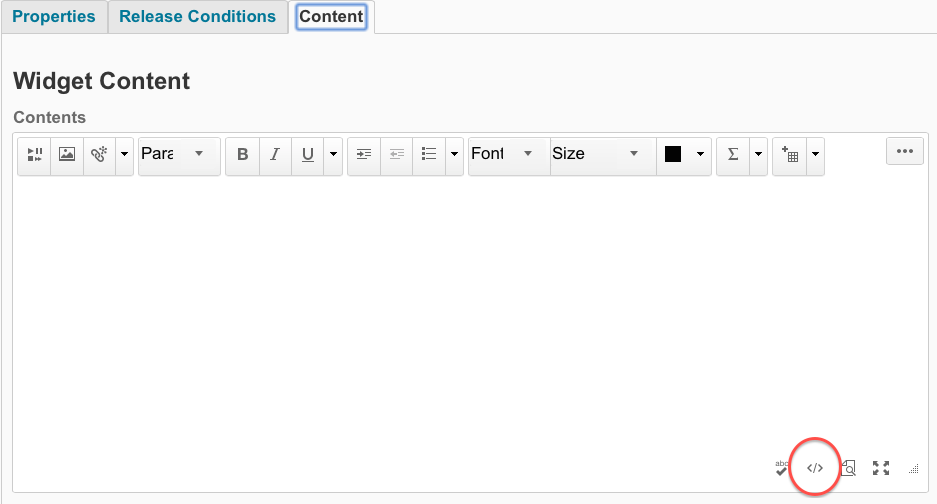
6) Once you’ve named your Widget, click on the Content Tab and then click on the HTML symbol at the bottom right of the editing window, as indicated by the red oval. This is where you will paste some HTML code from Twitter. Rest assured that you will not need to know anything about HTML to do this!
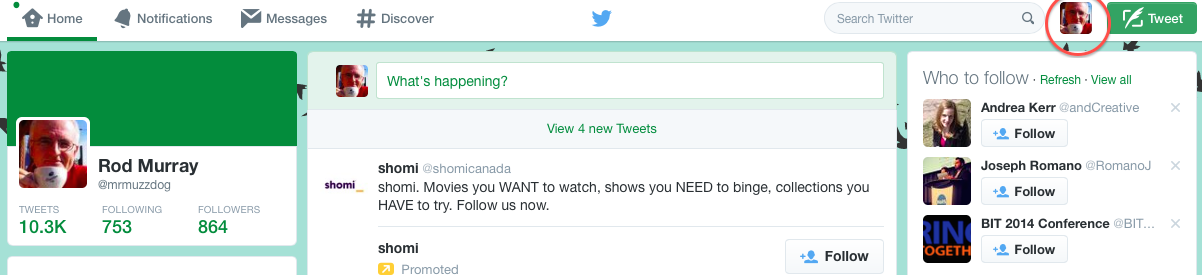
7) Now jump over to Twitter in another Browser tab and sign into Twitter with your email and password, leaving the D2L Content tab open as you will be pasting code into the Editing Window there. Click on your Twitter photo or icon at the top right of your Twitter homepage as indicated by the red oval below, to access your Settings and Twitter widgets. Click on Settings in the drop down menu.
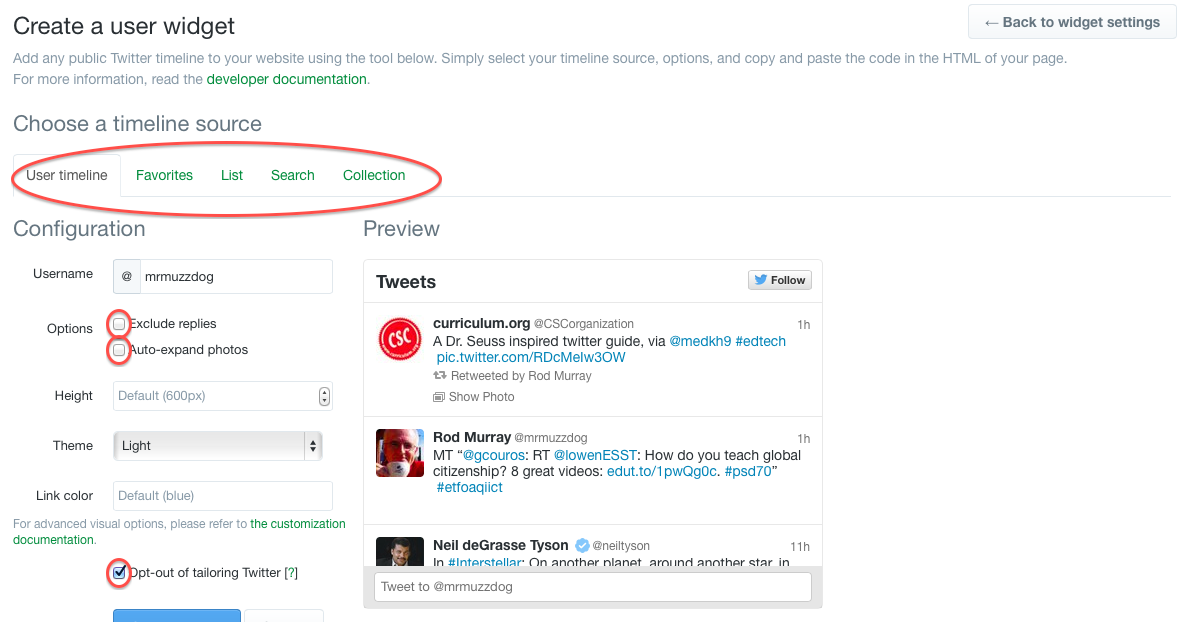
8) Next, in the list at the left, click on Widgets and then click Create New Widget. Once you’ve decided which type of Twitter Widget you wish to create, click the corresponding tab: User Timeline (e.g. @mrmmuzzdog, @etfoaq, @yourname, etc), Favourites (all the tweets you have added to your Favourite list), List (Twitter can create a single feed from a list of users), a Search (e.g. any #hashtag, #etfoaqiict, #mathchat) or Collection. You will, in all likelihood, be creating a User Timeline (a personal feed) or a #hashtag search feed for your course homepage.
Uncheck the following boxes: Include Replies and Auto Expand. Check the Opt-out of Tailoring box as shown below. Click Create Widget and click Save Changes. The HTML Code appears in a window. You’re almost there!
9) Now copy the HTML code from the window near the bottom, as shown in the red oval below, after checking to see that the Tweets you expect to be in the feed show in the Preview.
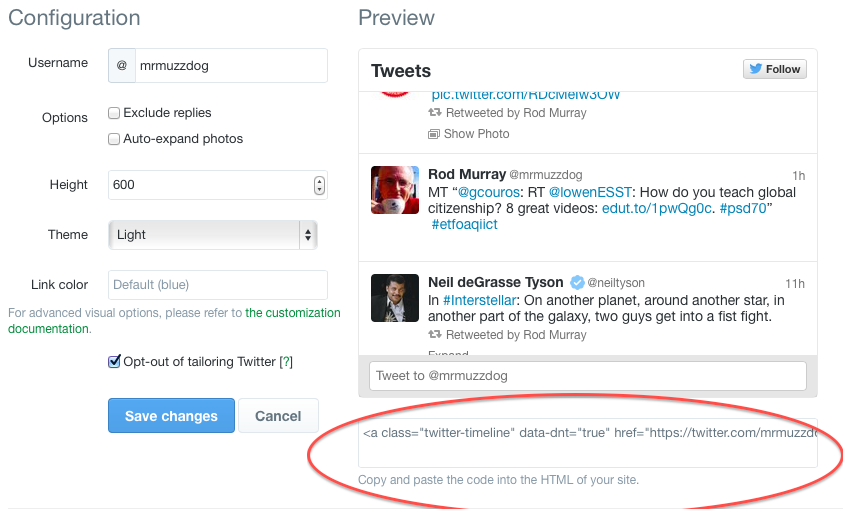
10) Finally, go back to the D2L Widget and paste the HTML Code into the HTML Source editing window, click Save, then click Save and Close, to close your D2L Widget. In the Homepage tab, click again on the Course Default Copy, and near the bottom of the page, you’ll see page layouts and an Add Widget Button, as shown in the illustration. Click on the name of the Widget you just created, and drag it to the location you want. Save and Close.

Check to see if it displays properly and if not, delete the Widget. One main reason it does not display is that the Course Default Copy must be the Active Course. There is an Active Homepage drop down menu that chooses the Active page. Make sure your Copy is Active!
11) If you have already created a Twitter Widget in D2L for a previous course (e.g. a #etfoaqiict Search widget and only need to add it to your current course, then you will only need to do the latter part of Step #10, by dragging an existing widget to the Active Homepage, in an appropriate location.
Voila! You’re done!
And for a those new to Twitter, who want a little humour with their first steps into it, here’s a Twitter Guide for new Users in the style of Dr. Seus, from Hootsuite!

Twitter by Dr Seus
Using Intelligent Agents in D2L to Enhance Your Online Course
Release Conditions, Replace Strings and Intelligent Agents
There are three integrated tools that can enhance courses, increase communication and benefit candidates, that fall under the umbrella of “Intelligent Agents.” These lesser known tools are what D2L Community Manager Barry Dahl calls “secret agents.” Using {replace strings}, release conditions and intelligent agents can save instructors time, make learners more accountable and engage learners when they complete tasks or conversely, neglect to keep up with the flow of the course.
“Intelligent Agents” are tools that automate the creation and delivery of communication based on the activities of a student, or any other criteria. An example would be the creation of an email reminder to any student that has not logged in for 3 days. D2L can be set up to deliver a customized email to do that automatically. When we use the {firstname} string to write a News items, so each Candidate’s name appears at the top, we are using a basic form of Intelligent Agent to personalize communication. Using {strings} are an important part of Intelligent Agents.
Brightspace Community’s Intro to Intelligent Agents
Take a minute to view the Intelligent Agents Introduction Video :
Barry Dahl, D2L’s Community manager, who organizes content in D2L’s Brightspace Community, has posted a slideshow presentation on the basics of Intelligent Agents.
Barry Dahl’s Slideshare on Intelligent Agents
Along with these two visuals, there is a rich collection of information, documents and tutorial videos at D2L’s Brightspace Community, under the search criteria “Intelligent Agents.” Links to some of the resources are listed below, as well as others from around the D2L community.
How to Set Up an Intelligent Agent
Imagine that we need to set up an Intelligent Agent for the scenario in which a candidate has not recently logged in, where D2L will generate an email to such candidates. That email can also be sent as a bcc to the instructor. This is one of the easiest to do, and Brightspace has a Tutorial, found on their site and on their Youtube Channel. In their example, an Intelligent Agent is created to send an email to a Candidate that has not logged in for 5 days, and also has failed an assignment. In ETFO AQs you’ll only need to set the first criteria, and you may wish to adjust the number of days to 3 (or whatever you deem to be appropriate).
Start by clicking on Edit Course at the top of your Course Homepage and under the Heading “Communication,” there’s an Intelligent Agent button. Now follow the steps in their Create New Agent Video Tutorial:
There are numerous criteria that you could choose as Release Conditions for an Intelligent Agent. You can create one to send a congratulatory email when an item is completed on a Checklist, or an LE Checklist is completed, or when a certain Content area is read, or when an assignment is uploaded to the Dropbox. Here is a more complete list of the Conditions that can generate an Intelligent Agent email. Click on the list to enlarge.

I suggest setting up a simple Intelligent Agent, such as a reminder to login to the course, as your first experiment with intelligent agents. You can use the Recipe Book from the Brightspace Community featured in the Resources below to help you do this.
Resources:
- D2L’s Brightspace Community Website
- Barry Dahl’s Intelligent Agent Slideshare
- Download the Brightspace Introduction to Intelligent Agents Recipe Book here
- DePaul University’s Intelligent Agent Guide
- Colorado University’s Replacement String Guide
- D2L Brightspace Youtube Video -Intelligent Agents #1
- D2L Brightspace Youtube Video -Intelligent Agents #2
ETFO AQ Instructors, if you have further questions about Intelligent Agents, you can contact me at my ETFO AQ email address! You can also add comments or question, if you wish, below.
The Importance of Authenticity Inside and Outside the Classroom
Do our teacher training courses offer authentic tasks with an audience for our work? See why it’s important in Dr. Jackie Gerstein’s latest Blog post.
I teach graduate educational technology courses at Boise State University to mostly in-service teachers. One of them is Integrating Technology Into the Classroom. It as a course with a project-based learning framework. Learners are given a series of course projects and asked to develop learning activities for their particular content areas and grade levels. Examples include developing a video library and associated lesson for their content area; developing a lesson for their content area that uses social media, etc.
This morning I received the following communication from a co-instructor:
Jackie, I thought you would want to know this. I teach 514. I ask each student to reflect on a “best learning experience” and this semester I have a student in 514 who wrote the following:
My experience of EDTECH 541 stands out for me as the best experience I have had in learning. I say this for many reasons, and…
View original post 515 more words
A 7-Step Typography Lesson for First-time eLearning Developers
Despite the utility of multimedia in eLearning, images and even videos can only go so far: the core source of information remains text. Accordingly, a basic knowledge of typography is a must for any eLearning designer. Good typography enhances readability, encourages information processing, creates a visual hierarchy, and even engages readers’ emotions.
Have you ever wanted to start a blog, but didn’t know how?

Have you ever wanted to start a blog, but didn’t know how?.
A great Blog post on how to get started with Blogging.
Studies Confirm the Power of Visuals in eLearning

We are now in the age of visual information where visual content plays a role in every part of life. As 65 percent of the population are visual learn
Source: info.shiftelearning.com
 The Rodcast